Back
Back
How to Analyze Competitor Ads With an AI Assistant
How to Analyze Competitor Ads With an AI Assistant

Table of Contents
Connect current, structured competitor creative data so your assistant can compare hooks, formats, messages, and market changes across the brands you track.
TL;DR An AI assistant can analyze competitor ads when it can query a current, structured source for the brands you track. Store each item with fields such as brand, platform, format, hook, message, date, and available signal. Connect that source through an approved app, API, or MCP integration. Then ask scoped questions, inspect the supporting records, and validate recommendations with first-party campaign results. A screenshot helps with one creative; a connected dataset makes the workflow repeatable. |
You may already use an AI assistant to explain your funnel, summarize research, or draft a brief. Competitor analysis is harder because the assistant often sees a different sample each time: a few screenshots, a handful of web pages, or a dashboard that has not been exported into consistent fields.
The problem is data design. Competitor analysis becomes dependable when the assistant can query the same brands, dates, platforms, creative labels, and source records on every request. The model can then compare a defined market instead of assembling an answer from unrelated examples.
Connect current, structured competitor creative data so your assistant can compare hooks, formats, messages, and market changes across the brands you track.
TL;DR An AI assistant can analyze competitor ads when it can query a current, structured source for the brands you track. Store each item with fields such as brand, platform, format, hook, message, date, and available signal. Connect that source through an approved app, API, or MCP integration. Then ask scoped questions, inspect the supporting records, and validate recommendations with first-party campaign results. A screenshot helps with one creative; a connected dataset makes the workflow repeatable. |
You may already use an AI assistant to explain your funnel, summarize research, or draft a brief. Competitor analysis is harder because the assistant often sees a different sample each time: a few screenshots, a handful of web pages, or a dashboard that has not been exported into consistent fields.
The problem is data design. Competitor analysis becomes dependable when the assistant can query the same brands, dates, platforms, creative labels, and source records on every request. The model can then compare a defined market instead of assembling an answer from unrelated examples.
What an AI assistant needs for competitor ad analysis
What an AI assistant needs for competitor ad analysis
A useful connection gives the assistant five things: a defined market, structured fields, a current refresh date, an explicit signal, and a path back to the source creative. Remove any one of those and the answer becomes harder to audit.
Requirement | What good implementation looks like |
|---|---|
Defined scope | Brands, geography, platforms, and date range are fixed before the query runs. |
Consistent fields | Every creative uses the same labels for format, hook, message type, offer, CTA, and timing. |
Freshness | The dataset shows when each source was collected and when the full set was last refreshed. |
Signal definition | Use rate, duration, variant count, and public engagement are named clearly. Private conversion performance is kept separate. |
Source evidence | Each row links back to the ad, post, image, video, or archived record that supports the answer. |
ONE INSIGHT The assistant does not need more screenshots. It needs a stable market dataset that can be queried, compared, and checked again next week. |
A useful connection gives the assistant five things: a defined market, structured fields, a current refresh date, an explicit signal, and a path back to the source creative. Remove any one of those and the answer becomes harder to audit.
Requirement | What good implementation looks like |
|---|---|
Defined scope | Brands, geography, platforms, and date range are fixed before the query runs. |
Consistent fields | Every creative uses the same labels for format, hook, message type, offer, CTA, and timing. |
Freshness | The dataset shows when each source was collected and when the full set was last refreshed. |
Signal definition | Use rate, duration, variant count, and public engagement are named clearly. Private conversion performance is kept separate. |
Source evidence | Each row links back to the ad, post, image, video, or archived record that supports the answer. |
ONE INSIGHT The assistant does not need more screenshots. It needs a stable market dataset that can be queried, compared, and checked again next week. |
The five-stage workflow for market-aware AI analysis
The five-stage workflow for market-aware AI analysis
Use the following sequence whether the connection is an app, an API, or an MCP server. The technical route can change. The analytical discipline should not.
1 | Source. Collect the competitor creatives that match a defined brand set, geography, platform mix, and time period. Record the source URL or creative ID. |
2 | Structure. Apply the same fields to every item. Common fields include brand, platform, format, hook, message type, offer, CTA, first-seen date, and available signal. |
3 | Connect. Expose the approved dataset through a supported app, API, or MCP connection. Document authentication, permissions, plan requirements, and refresh behavior. |
4 | Ask. Write a scoped question that names the brands, date range, comparison field, and output format. Require source examples and missing-data notes. |
5 | Verify. Check the supporting rows before briefing creative. Treat market signals as hypotheses, then validate the next test with your own CTR, CPA, conversion rate, or ROAS. |
Use the following sequence whether the connection is an app, an API, or an MCP server. The technical route can change. The analytical discipline should not.
1 | Source. Collect the competitor creatives that match a defined brand set, geography, platform mix, and time period. Record the source URL or creative ID. |
2 | Structure. Apply the same fields to every item. Common fields include brand, platform, format, hook, message type, offer, CTA, first-seen date, and available signal. |
3 | Connect. Expose the approved dataset through a supported app, API, or MCP connection. Document authentication, permissions, plan requirements, and refresh behavior. |
4 | Ask. Write a scoped question that names the brands, date range, comparison field, and output format. Require source examples and missing-data notes. |
5 | Verify. Check the supporting rows before briefing creative. Treat market signals as hypotheses, then validate the next test with your own CTR, CPA, conversion rate, or ROAS. |
What competitor creative data should be structured
What competitor creative data should be structured
Data group | Recommended fields |
|---|---|
Scope | Brand set; account or page; country or region; platform; date range |
Creative identity | Creative ID; source URL; asset type; active or inactive status |
Creative strategy | Hook; format; message type; offer; CTA; visual device; emotional tone |
Timing | First seen; last seen; days active; collection date; dataset refresh date |
Market signals | Use rate; number of variants; recurrence; public engagement; modeled estimates where clearly labeled |
First-party results | CTR; CPA; conversion rate; revenue; ROAS for your own campaigns only |
A public source can show what a competitor is running. It usually cannot show the competitor’s private conversion metrics. Keep visible market signals and first-party business results in separate columns so the assistant cannot blur them together.
Data group | Recommended fields |
|---|---|
Scope | Brand set; account or page; country or region; platform; date range |
Creative identity | Creative ID; source URL; asset type; active or inactive status |
Creative strategy | Hook; format; message type; offer; CTA; visual device; emotional tone |
Timing | First seen; last seen; days active; collection date; dataset refresh date |
Market signals | Use rate; number of variants; recurrence; public engagement; modeled estimates where clearly labeled |
First-party results | CTR; CPA; conversion rate; revenue; ROAS for your own campaigns only |
A public source can show what a competitor is running. It usually cannot show the competitor’s private conversion metrics. Keep visible market signals and first-party business results in separate columns so the assistant cannot blur them together.
What MCP adds to the workflow
What MCP adds to the workflow
The Model Context Protocol is an open-source standard for connecting AI applications to external data, tools, and workflows. An MCP server can expose a controlled set of competitor records and query tools to a compatible assistant.[1]
MCP is one connection option. A built-in app or a conventional API can support the same marketer workflow. Choose the route your assistant, security team, and product account support.
In ChatGPT, apps can connect external information and actions, and custom apps can use MCP-backed tools. Availability depends on the app, plan, workspace settings, role, region, and permissions.[2]
OpenAI currently documents full MCP capabilities in ChatGPT as a beta for eligible Business, Enterprise, and Edu workspaces, with administrator controls and changing functionality. That makes a verified integration guide more useful than generic pseudocode.[3]
IMPLEMENTATION RULE Publish code only after it has been tested against the current endpoint, authentication flow, tool names, response schema, plan, and permissions. Keep the marketer guide focused on the data and decisions; link to separate technical documentation for setup. |
The Model Context Protocol is an open-source standard for connecting AI applications to external data, tools, and workflows. An MCP server can expose a controlled set of competitor records and query tools to a compatible assistant.[1]
MCP is one connection option. A built-in app or a conventional API can support the same marketer workflow. Choose the route your assistant, security team, and product account support.
In ChatGPT, apps can connect external information and actions, and custom apps can use MCP-backed tools. Availability depends on the app, plan, workspace settings, role, region, and permissions.[2]
OpenAI currently documents full MCP capabilities in ChatGPT as a beta for eligible Business, Enterprise, and Edu workspaces, with administrator controls and changing functionality. That makes a verified integration guide more useful than generic pseudocode.[3]
IMPLEMENTATION RULE Publish code only after it has been tested against the current endpoint, authentication flow, tool names, response schema, plan, and permissions. Keep the marketer guide focused on the data and decisions; link to separate technical documentation for setup. |
How to write prompts that return grounded competitor analysis
How to write prompts that return grounded competitor analysis
A broad prompt such as “What are competitors doing?” gives the assistant too much room to choose its own scope. A grounded prompt names the market, period, field, signal, evidence requirement, and decision you need to make.
PROMPT TEMPLATE |
Message mix: Which message types are gaining or declining across the selected brands in the last 60 days?
Creative whitespace: Which hooks or formats appear less often than the category average, and what source examples support that finding?
Change detection: Which competitor introduced a new offer, visual device, or creator format since the previous refresh?
Brand divergence: Where does our creative mix differ from the market, and which differences are intentional versus unsupported?
Briefing: Turn the strongest descriptive pattern into one creative hypothesis, one control, and one success metric from our own ad account.
A broad prompt such as “What are competitors doing?” gives the assistant too much room to choose its own scope. A grounded prompt names the market, period, field, signal, evidence requirement, and decision you need to make.
PROMPT TEMPLATE |
Message mix: Which message types are gaining or declining across the selected brands in the last 60 days?
Creative whitespace: Which hooks or formats appear less often than the category average, and what source examples support that finding?
Change detection: Which competitor introduced a new offer, visual device, or creator format since the previous refresh?
Brand divergence: Where does our creative mix differ from the market, and which differences are intentional versus unsupported?
Briefing: Turn the strongest descriptive pattern into one creative hypothesis, one control, and one success metric from our own ad account.
Example: an illustrative telco message-type read
Example: an illustrative telco message-type read
The source draft includes a 4,298-post example drawn from organic and brand-social content across selected US telco brands. That makes it a creative-intelligence example, not a paid-ad performance study. The brand list, platforms, date range, labeling method, refresh date, and engagement definition still need to be supplied before publication.
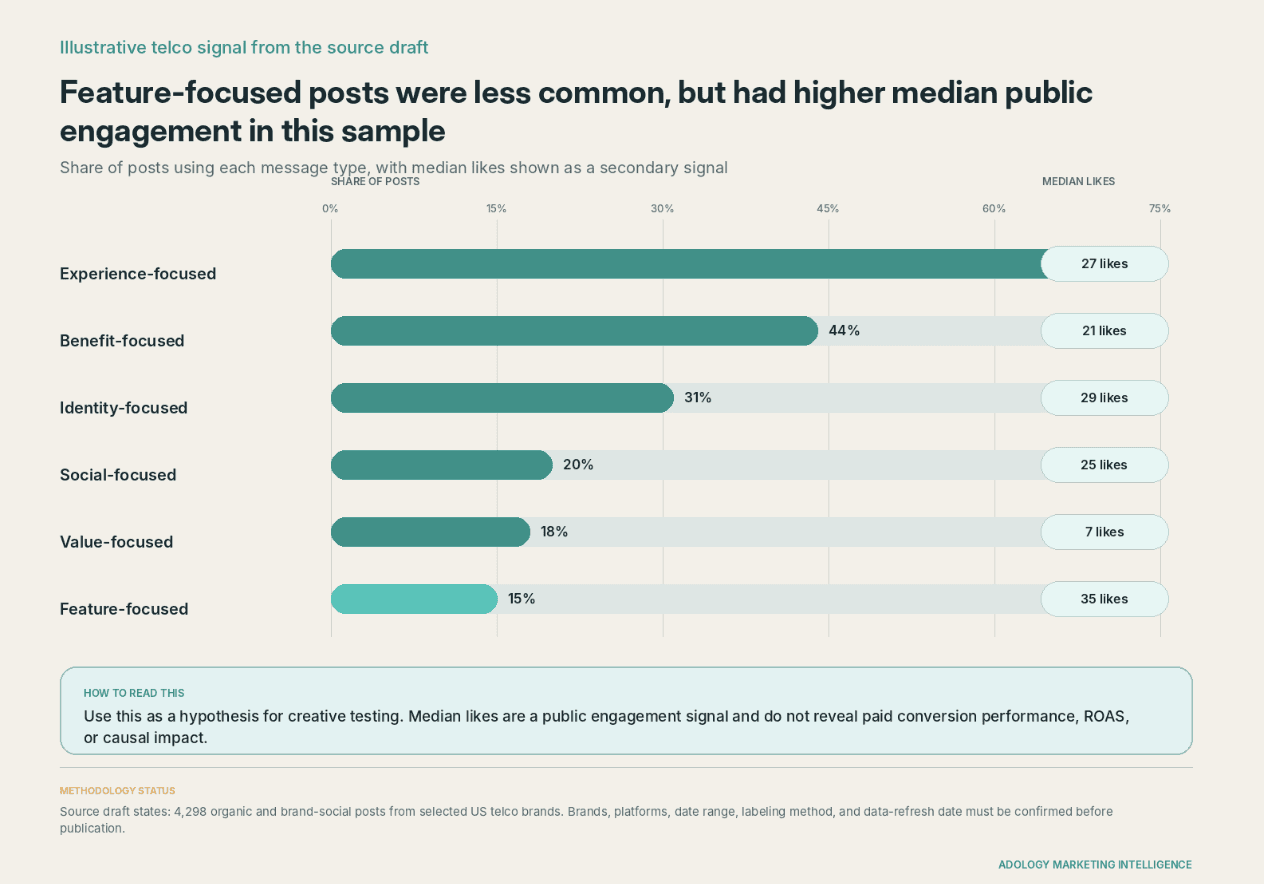
Illustrative data from the original Adology draft. Public engagement is a descriptive signal; it does not establish paid conversion performance or causality.
In the supplied sample, Experience-focused content appeared in 69.4% of posts and had 27 median likes. Feature-focused content appeared in 15% and had 35 median likes. The defensible conclusion is narrow: Feature-focused posts were less common and had higher median public engagement within this sample.
That finding can support a test hypothesis. It cannot prove that Feature-focused paid ads would reduce CPA or increase conversion rate. A marketer should test the creative in a controlled campaign and judge it with first-party results.
The source draft includes a 4,298-post example drawn from organic and brand-social content across selected US telco brands. That makes it a creative-intelligence example, not a paid-ad performance study. The brand list, platforms, date range, labeling method, refresh date, and engagement definition still need to be supplied before publication.
Illustrative data from the original Adology draft. Public engagement is a descriptive signal; it does not establish paid conversion performance or causality.
In the supplied sample, Experience-focused content appeared in 69.4% of posts and had 27 median likes. Feature-focused content appeared in 15% and had 35 median likes. The defensible conclusion is narrow: Feature-focused posts were less common and had higher median public engagement within this sample.
That finding can support a test hypothesis. It cannot prove that Feature-focused paid ads would reduce CPA or increase conversion rate. A marketer should test the creative in a controlled campaign and judge it with first-party results.
What competitor data can and cannot tell you
What competitor data can and cannot tell you
Data available | What it can support | What it cannot prove |
|---|---|---|
Creative, copy, format, and date | What competitors are running and how the visible mix changes | Private conversions or profit |
Variant count and recurrence | What a competitor may be prioritizing or iterating | The exact budget behind each variant |
Days active or repeated sightings | Persistence within the observed source | Why the ad stayed active or whether it hit its KPI |
Public engagement | Visible response on the public platform | CTR, CPA, ROAS, or causal impact |
Modeled spend or traffic estimates | Directional context when the vendor explains its model | Audited account-level performance |
Your first-party ad-account data | Actual outcomes for your own campaigns | A competitor’s private results |
Data available | What it can support | What it cannot prove |
|---|---|---|
Creative, copy, format, and date | What competitors are running and how the visible mix changes | Private conversions or profit |
Variant count and recurrence | What a competitor may be prioritizing or iterating | The exact budget behind each variant |
Days active or repeated sightings | Persistence within the observed source | Why the ad stayed active or whether it hit its KPI |
Public engagement | Visible response on the public platform | CTR, CPA, ROAS, or causal impact |
Modeled spend or traffic estimates | Directional context when the vendor explains its model | Audited account-level performance |
Your first-party ad-account data | Actual outcomes for your own campaigns | A competitor’s private results |
How to start competitor ad analysis without an integration
How to start competitor ad analysis without an integration
You can test the workflow manually before asking a developer or administrator to connect a source.
1 | Define the market. Choose three close competitors, one geography, the channels that matter, and a fixed 30-day review period. |
2 | Collect active creatives. Use the Meta Ad Library or another official source to record active ads, source links, brands, and collection dates. Meta says the Ad Library lets people search ads that are currently active across Meta products. |
For ordinary commercial ads, the Meta Ad Library is useful for observing current creative. The additional spend and reach details described by Meta apply to issue, election, and political ads rather than all commercial ads.[4]
3 | Tag the same fields. Use a spreadsheet with brand, platform, format, hook, message type, offer, CTA, first-seen date, and source URL. |
4 | Track prevalence and persistence. Count how often patterns appear and whether they remain active across weekly checks. Treat those as prioritization signals, not proof of performance. |
5 | Write one test. Turn the strongest descriptive pattern into a creative hypothesis. Validate it with your own campaign metrics. |
You can test the workflow manually before asking a developer or administrator to connect a source.
1 | Define the market. Choose three close competitors, one geography, the channels that matter, and a fixed 30-day review period. |
2 | Collect active creatives. Use the Meta Ad Library or another official source to record active ads, source links, brands, and collection dates. Meta says the Ad Library lets people search ads that are currently active across Meta products. |
For ordinary commercial ads, the Meta Ad Library is useful for observing current creative. The additional spend and reach details described by Meta apply to issue, election, and political ads rather than all commercial ads.[4]
3 | Tag the same fields. Use a spreadsheet with brand, platform, format, hook, message type, offer, CTA, first-seen date, and source URL. |
4 | Track prevalence and persistence. Count how often patterns appear and whether they remain active across weekly checks. Treat those as prioritization signals, not proof of performance. |
5 | Write one test. Turn the strongest descriptive pattern into a creative hypothesis. Validate it with your own campaign metrics. |
How Adology fits into a market-aware AI workflow
How Adology fits into a market-aware AI workflow
Adology gives marketing and brand teams a structured view of advertising and social creative across the competitive landscape. Teams can compare brands, analyze creative elements and messaging, and build Knowledge Sets scoped to the category they care about.
That structure is the useful product layer. Once an approved connection is available, the assistant can query the same Knowledge Set instead of relying on a different manual sample for every question.
NEXT STEP Start with your brand and three competitors. Define the date range, required fields, and signal before connecting anything. Then use the supported Adology app, API, MCP connection, or export available in your account to run the first scoped question. |
Adology gives marketing and brand teams a structured view of advertising and social creative across the competitive landscape. Teams can compare brands, analyze creative elements and messaging, and build Knowledge Sets scoped to the category they care about.
That structure is the useful product layer. Once an approved connection is available, the assistant can query the same Knowledge Set instead of relying on a different manual sample for every question.
NEXT STEP Start with your brand and three competitors. Define the date range, required fields, and signal before connecting anything. Then use the supported Adology app, API, MCP connection, or export available in your account to run the first scoped question. |
Frequently asked questions
Frequently asked questions
Can an AI assistant analyze competitor ads?
An AI assistant can analyze competitor ads when it has a defined source and consistent fields for the brands, platforms, and dates in scope. It can also inspect individual screenshots or web pages, but those one-off inputs do not create a repeatable category dataset.
What is the difference between uploading screenshots and connecting a dataset?
A screenshot gives the assistant one static creative. A connected dataset gives it many records with the same fields, refresh dates, and source links. That makes comparisons repeatable and easier to audit.
Does MCP make competitor analysis accurate?
MCP does not guarantee analytical accuracy. It standardizes how an AI application can access external data and tools. The answer still depends on source coverage, labeling quality, prompt scope, freshness, and human verification.
Can competitor intelligence reveal ROAS or conversions?
Public competitor intelligence usually cannot reveal private ROAS, CPA, conversion rate, or revenue. It can show creative activity, timing, recurrence, visible engagement, and other market signals. Use your own ad-account data to validate business performance.
Do I need a developer to connect competitor data?
The setup owner depends on the connection. A prebuilt app may need only account authorization or workspace approval. A custom API or MCP connection may need a developer and administrator. Plan and permission requirements vary by assistant and workspace.
How current should the dataset be?
The article should state the last refresh date and collection frequency. “Current” might mean daily, weekly, or another documented interval. Avoid calling data live unless the source genuinely updates in real time.
Can I start for free?
Yes. The Meta Ad Library is a useful free source for active ads across Meta products. Use it to collect and tag current creative. Do not treat the free library as a source of ordinary commercial ad spend or conversion performance.
Is the telco example paid-ad data?
No. The source draft identifies the 4,298-item telco example as organic and brand-social creative. It should be described as a creative signal until an actual paid-ad dataset and complete methodology are supplied.
Can an AI assistant analyze competitor ads?
An AI assistant can analyze competitor ads when it has a defined source and consistent fields for the brands, platforms, and dates in scope. It can also inspect individual screenshots or web pages, but those one-off inputs do not create a repeatable category dataset.
What is the difference between uploading screenshots and connecting a dataset?
A screenshot gives the assistant one static creative. A connected dataset gives it many records with the same fields, refresh dates, and source links. That makes comparisons repeatable and easier to audit.
Does MCP make competitor analysis accurate?
MCP does not guarantee analytical accuracy. It standardizes how an AI application can access external data and tools. The answer still depends on source coverage, labeling quality, prompt scope, freshness, and human verification.
Can competitor intelligence reveal ROAS or conversions?
Public competitor intelligence usually cannot reveal private ROAS, CPA, conversion rate, or revenue. It can show creative activity, timing, recurrence, visible engagement, and other market signals. Use your own ad-account data to validate business performance.
Do I need a developer to connect competitor data?
The setup owner depends on the connection. A prebuilt app may need only account authorization or workspace approval. A custom API or MCP connection may need a developer and administrator. Plan and permission requirements vary by assistant and workspace.
How current should the dataset be?
The article should state the last refresh date and collection frequency. “Current” might mean daily, weekly, or another documented interval. Avoid calling data live unless the source genuinely updates in real time.
Can I start for free?
Yes. The Meta Ad Library is a useful free source for active ads across Meta products. Use it to collect and tag current creative. Do not treat the free library as a source of ordinary commercial ad spend or conversion performance.
Is the telco example paid-ad data?
No. The source draft identifies the 4,298-item telco example as organic and brand-social creative. It should be described as a creative signal until an actual paid-ad dataset and complete methodology are supplied.

How to Analyze What Social Listening Misses in Video Posts
How to Analyze What Social Listening Misses in Video Posts

How to Build a Competitive Creative Briefing Executives Will Actually Use
How to Build a Competitive Creative Briefing Executives Will Actually Use

Your Swipe File Is Dysfunctional. Let’s Fix It
Your Swipe File Is Dysfunctional. Let’s Fix It

Why Better Prompts Don’t Fix Generic Marketing Advice
Why Better Prompts Don’t Fix Generic Marketing Advice

How to Benchmark Competitor Creative Against Client Goals
How to Benchmark Competitor Creative Against Client Goals

What Are Hydration Brands Actually Selling?
What Are Hydration Brands Actually Selling?

Is It a Creative Pattern or a Standout Ad?
Is It a Creative Pattern or a Standout Ad?

How to Find Creative Whitespace in Competitor Ads
How to Find Creative Whitespace in Competitor Ads
Best Ad Intelligence Tools in 2026: An Honest Breakdown
Best Ad Intelligence Tools in 2026: An Honest Breakdown

How to Analyze Competitor Ads (Without the Screenshot Grind)
How to Analyze Competitor Ads (Without the Screenshot Grind)
The market
The market
is moving right now.
is moving right now.
Your competitors' intelligence is updating. Your next brief will either start from what's actually working in your category this week, or it won't.
Your competitors' intelligence is updating. Your next brief will either start from what's actually working in your category this week, or it won't.
Free signup
Free signup
Pay as you go
Pay as you go
Cancel whenever
Cancel whenever
ADOLOGY AI
ADOLOGY AI
Marketing intelligence that holds itself accountable. Watches your market continuously, ships intelligence into your workflows, grades itself on every call.
Marketing intelligence that holds itself accountable. Watches your market continuously, ships intelligence into your workflows, grades itself on every call.
ADOLOGY
© 2026 Adology. All rights reserved.
© 2026 Adology. All rights reserved.